Today marks a major milestone in the history of the Internet. With the release of Firefox 1.0, the Mozilla Organization has incontrovertibly proven that, given enough time, the open-source development model can, and will, build superior software to that of their commercial competitors.
Firefox is to client-side applications what Linux is to operating systems. Just as Linux has emerged as the pre-eminent OS for enterprise applications, Firefox has an opportunity to reclaim market share from Microsoft's anemic Internet Explorer. The fact that IE comes pre-installed on millions of desktop computers is the only reason that it will retain any lead at all. If the playing field were level, and if Microsoft were not a convicted monopolist, then Firefox would already have climbed to the top of the browser market.
Why? Simply because it is better in all ways than Internet Explorer. Firefox loads pages faster. Firefox is far, far more secure. Firefox runs on Windows, Mac OS X, and Linux. Firefox offers tabbed browsing and pop-up blocking. Firefox has hundreds of free extensions and themes to customize the experience. Firefox will improve your productivity on the web by an order of magnitude. Firefox offers everything that Internet Explorer does and a thousand things more. And moreover, Firefox gets a little bit better every single day, thanks to the passion of the open source development community.
Of course, I've been using Firefox (and the other Mozilla browsers) for years. Aside from the time I worked at Microsoft, I never used Internet Explorer. And even then I used Netscape's browser when I could. But those were the dark days in which Microsoft "won" the browser war, and pushed the Internet away from open standards and into a proprietary world of closed systems. But the consequence of those closed systems was pre-ordained. The current plague of viruses and spy-ware and security holes is a direct consequence of leveraging monopoly power to push inferior technology on the masses, without recourse to external audits or fair competition.
Fortunately, and perhaps inexplicably, Microsoft dropped the ball. They failed to fundamentally improve Internet Explorer. They did not release a single major innovation or improvement in the past 4 years. Rather than capitalize on the market-share advantage they held and improve the technology itself, Microsoft was content leverage their dominance by further locking their customers in. They scared their users about the high cost of switching to alternatives, but stopped offering anything valuable in return.
But now their customers have a viable exit strategy. A way of switching at no cost. Sure, it is just a web browser. But the web browser has become emblematic of the Internet itself. The web browser is the "thin edge of the wedge" that forces its way into the workplace, into the home, and begin to wean customers away from their proprietary lock-in. First it is Firefox. Then it will be open source mail readers. Then open source instant messaging clients. Then open source office suites.
And finally, once the application space has been reclaimed, the operating system itself is replaceable at little or no cost. And the heir-apparent is just waiting in the wings.
So how does one use Firefox?
The first step is to download a copy. It will only take a few minutes on a fast connection and take just a few seconds to install. Put a link to it on your desktop, and, if you are Windows user, make it your default web browser.
Next, here are some things that I do with Firefox. I've installed it on dozens of machines over the past year or two, and these are the sites and plug-ins that I've found most useful. They are not recommendations, per se, just ways in which I've learned to be most productive with Firefox.
Essential Homepage:
Not surprisingly, I've set my homepage to A9.com. Ten years ago, back when they were the only portal in the game, I set my homepage to Yahoo!. Then they launched My Yahoo!, and that took over as my home page for a while. Having immediate access to up-to-the-minute news, weather, and sports scores seemed to be the most useful thing at the time.
However, I was a little frustrated with the long load times of the My Yahoo! page, especially when I knew that I simply wanted to open up a browser window to go to another site. So I created my own lightweight web-based bookmark application that listed my top 50 or so links and ranked them by the number of times I clicked on them. That page loaded very quickly and was accessible from anywhere and it stayed as my home page for a number of years.
But some time around 2001, I started setting my home page to Google. And there it remained until just this year. The theory being that a certain percentage of time I was opening a web browser not knowing exactly where I wanted to go, but would instead be needing a search engine to find it. And since Google was so lightweight, it made for little delay in opening up a browser window.
Of course, Google has now been replaced as my homepage by A9.com. I still get the same web searches, but having the history right there is just incredibly valuable, and it is something one doesn't get using Google alone. I estimate that 1 in 5 or so of my initial clicks are for something that I've been working on or looking at in the past 24 hours, and having access to that context on my homepage saves a fair bit of time recreating the search.
Essential Bookmarks:
Seeing as how I bounce around between 4 or 5 different computers during the course of my day, keeping a large bookmark directory locally on each is impractical. Now I use web-based alternatives, such as Del.icio.us and A9, to manage the majority of my frequently accessed links.
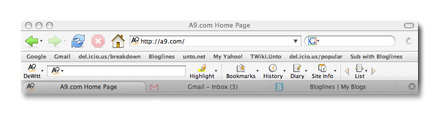
However, there are a handful of links that I put right on the Firefox Toolbar. Those differ from computer to computer insofar as my work machines have some extra links to intranet resources. But all of them include links to essential sites, such as:
- Google: I still use Google when I don't want to remember the search history. This could be for any number of reasons, but more often or not it is because it is just because it is easier to keep my work and my personal life completely separate. Eventually, A9 may be able to track different "personalities" for each user and thus obviate the need for this. Until then, I suspect that most people do the same thing. Of course, a viable alternative is to use generic.a9.com. That site doesn't track anything about the user -- much less than Google does, in fact.
- Gmail: I've written about how important Gmail is before, so I won't extol its virtues again here. But suffice it to say that Gmail is probably the first link I click on each morning and the first place I go when I sit back down at the machine.
- My personal del.icio.us bookmarks: I am amazed that I use del.icio.us as much as I do. Thanks in part to the Firefox plug-in, this social bookmark manager has become a regular part of my life. Whenever I see an interesting site that I might want to return to later, I add it. And, unlike local bookmarks, the interface never feels cluttered or unmanageable. Combine this with Buzz Andersen's Mac OS X Cocoal.icio.us client, and you have a very powerful, and fun, bookmark manager.
- Bloglines: Bloglines is my favorite site for RSS feed aggregation. I read about 30 different feeds regularly, and most of them I follow via Bloglines. Mark Fletcher, founder of Bloglines, has done an amazing job with this application and adds new features every week or so. One of the most interesting pages is the Blogline's Top Links list. This list is updated daily and tracks the most popular URLs referenced by the world's blogs. This is an indispensable tool for staying on top of current memes on the web.
- unto.net: Obviously.
- My Yahoo!: The My Yahoo page is still one of the most convenient places to keep track of news sources (I have about a dozen displayed on my customized page), scores, weather, and stock prices. It is interesting how things have changed -- a few years ago I checked this page 50 times a day. Now, maybe twice a day. I think that RSS feeds and sites like Google News mitigate the need for a single portal page.
- The unto.net wiki: A personal Wiki site that I maintain (running TWiki). I use this site to manage miscellaneous personal notes. However, I've found that the overhead of using a full Wiki is fine for professional needs (we use it extensively at work), but it is a little much for personal use. To that end I've been developing a light-weight alternative that I look forward to releasing publicly sometime soon.
- del.icio.us/popular: Similar to the Bloglines Top Feeds, the real power of a social bookmark manager is being able to keep abreast of what other people find interesting and useful. I have found dozens of sites that I otherwise would have missed simply by checking del.icio.us/popular once or twice a day.
Essential Extensions:
One of the strengths of Firefox is the plug-in architecture. Firefox has gone out of its way to provide a comprehensive set of APIs to third-party developers so that it can get the most out of the strength of the community. The developers of Firefox are hackers themselves, so they know that the best ideas frequently do not come from the heads of a product's owners, but rather from outsiders. And by offering a rich set of tools for third-party extensions, the Firefox team has already seen a rich set of rewards.
There is a complete list of Firefox extensions, but here are some of my favorites:
- Adblock: Blocks pretty much every type of annoying and intrusive web advertisement there is. It is so effective that I'd have reservations about using it at all, if not for the nascent market for text-based (and much less offensive) advertising.
- Del.icio.us extension: Used in conjunction with the del.icio.us social bookmark manager, this extension has all but replaced my need for a local bookmarks folder.
- The A9 Toolbar: A9 managed to beat Google to the punch and release a Mozilla/Firefox toolbar even before the official Firefox 1.0 release. While the A9 Toolbar is still in beta, it has all of the features of the IE toolbar, and is getting better every day. I use it regularly at work, and will adopt it at home once it is a little easier to toggle the privacy mode on and off. Amusingly, Google is hosting the default Firefox start page, but their toolbar doesn't work on Firefox yet. Google's a smart company, though, so their toolbar is sure to follow. In the meantime, try the A9 toolbar. It offers so much more functionality that I suspect you'll stick with it.
Those are a few of the reasons that I have been using and evangelizing Mozilla and Firefox over the years. I couldn't be happier that version 1.0 of Firefox has been released, and I look forward to the next generation of the web, with first-rate (and free) applications such as this leading the way.